

Game Design Recipes
Use these as starting points. Adjust challenge counts, durations, and gadget stock to fit your audience and venue.
Recipe 1 — The Icebreaker
Section titled “Recipe 1 — The Icebreaker”Use case: Indoor team building, corporate workshops, onboarding events where the goal is collaboration over competition.
Setup summary
Section titled “Setup summary”| Parameter | Value |
|---|---|
| Event mode | MooveIndoor (QR/iBeacon) or Classic with short routes |
| Challenge count | 8–12 challenges |
| Estimated duration | 45–60 minutes |
| Difficulty | Low — no GPS, no time pressure, focus on teamwork |
| Teams | 4–8 teams of 3–5 people |
| Gadgets | None (keep it simple for first-time users) |
| Objects | None |
| Segments | Single segment, no progressive unlock needed |
Challenge mix
Section titled “Challenge mix”| Type | Count | Purpose |
|---|---|---|
| Questions | 3–4 | Quiz-style trivia about the company, the venue, or general knowledge. Use multiple-choice for accessibility. |
| Find the Pairs | 2–3 | Memory card game with branded images or team photos. Encourages collaboration as the team discusses card positions. |
| Physical Activity | 2–3 | Movement-based challenges (jumping jacks, group photo poses). Breaks the ice physically and generates laughs. |
| Hints | 1–2 | Welcome messages, instructions, or fun facts between challenges. Use Never disappears so teams can re-read. |
Why it works
Section titled “Why it works”- No GPS dependency. MooveIndoor uses QR codes or iBeacon triggers, so the event works in any building regardless of GPS signal quality.
- Low-tech, low-stress. No gadgets or objects to manage. Teams focus on challenges, not game mechanics.
- Team collaboration. Find the Pairs requires memory and discussion. Physical Activity requires coordination. Questions test shared knowledge.
- Short and contained. Under one hour, one segment. Easy for first-time event managers to run.
Configuration tips
Section titled “Configuration tips”- For MooveIndoor, print QR code posters and place them at challenge stations around the venue. See Teams — QR Code for printing.
- Set all challenges to no time limit to reduce stress in a team-building context.
- Use extra points (1st/2nd/3rd bonus) only if you want a light competitive element.
- Consider disabling the live leaderboard if the goal is purely cooperative.
Recipe 2 — The City Explorer
Section titled “Recipe 2 — The City Explorer”Use case: Tourism events, sightseeing tours, city discovery games where the route is the main attraction.
Setup summary
Section titled “Setup summary”| Parameter | Value |
|---|---|
| Event mode | Classic (outdoor, GPS-based) |
| Challenge count | 12–16 challenges |
| Estimated duration | 2–3 hours |
| Difficulty | Medium — GPS navigation, moderate challenge variety |
| Teams | 6–20 teams of 2–4 people |
| Gadgets | None (sightseeing, not competing) |
| Objects | 4–6 collectible “stamps” for a passport mechanic |
| Segments | 2–3 segments for natural rest breaks |
Challenge mix
Section titled “Challenge mix”| Type | Count | Purpose |
|---|---|---|
| Geolocated Video | 3–4 | History narration at landmarks. Upload pre-recorded guide videos to the gallery. The simplified form (no scoring) is appropriate for informational content. |
| Picture / Video | 4–5 | Selfie challenges at landmarks (“Take a group photo recreating this statue’s pose”). Enable the video option for creative tasks. |
| Hints | 2–3 | Informational stops with historical context, directions to the next area, or fun facts about the neighborhood. Use the Never disappears option so teams can re-read them. |
| Questions | 3–4 | Quiz questions about the locations visited — reinforces what teams learned from the geolocated videos and hints. |
Objects: the passport mechanic
Section titled “Objects: the passport mechanic”Create 4–6 objects named after landmarks or neighborhoods (e.g., “Gothic Quarter Stamp,” “Cathedral Seal”). Configure challenges to award one object upon completion. At the end of the event, teams that collected all stamps have completed the “passport.”
- Set Initial Stock to 0 for each object (teams earn them, they do not start with any).
- Link each stamp object to a specific challenge via the challenge’s object reward field.
- Optionally, require a final challenge to need all stamps as a prerequisite — this creates a collection-based finale.
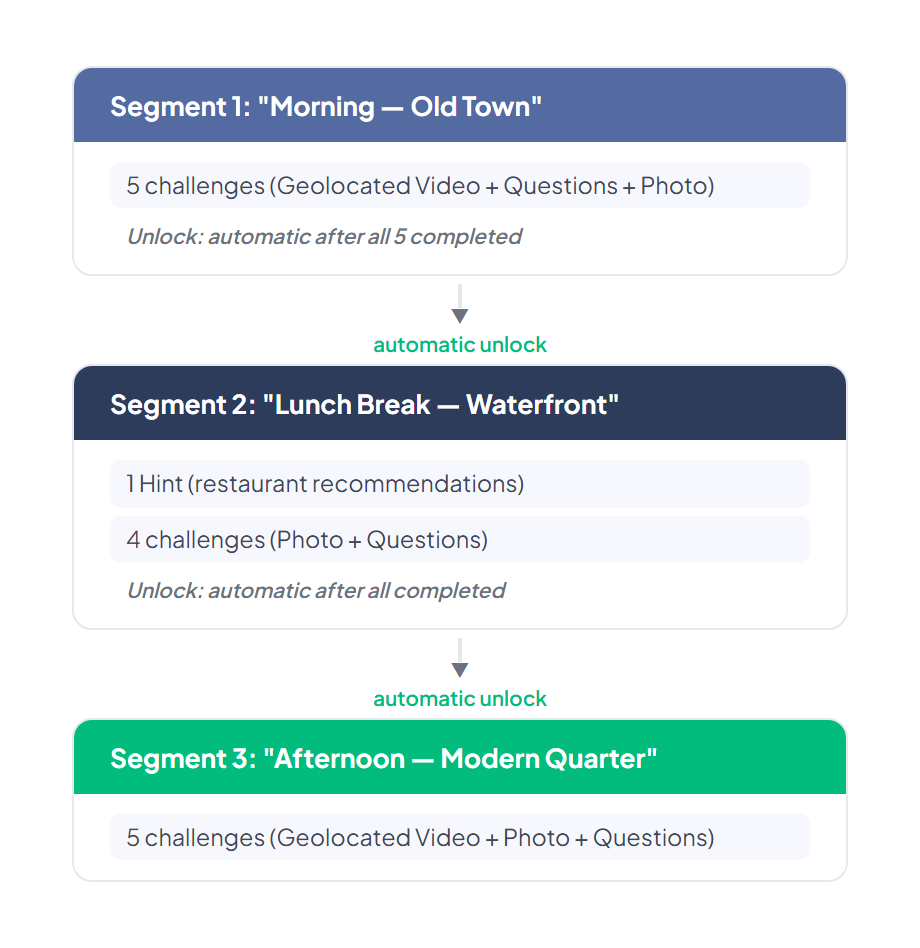
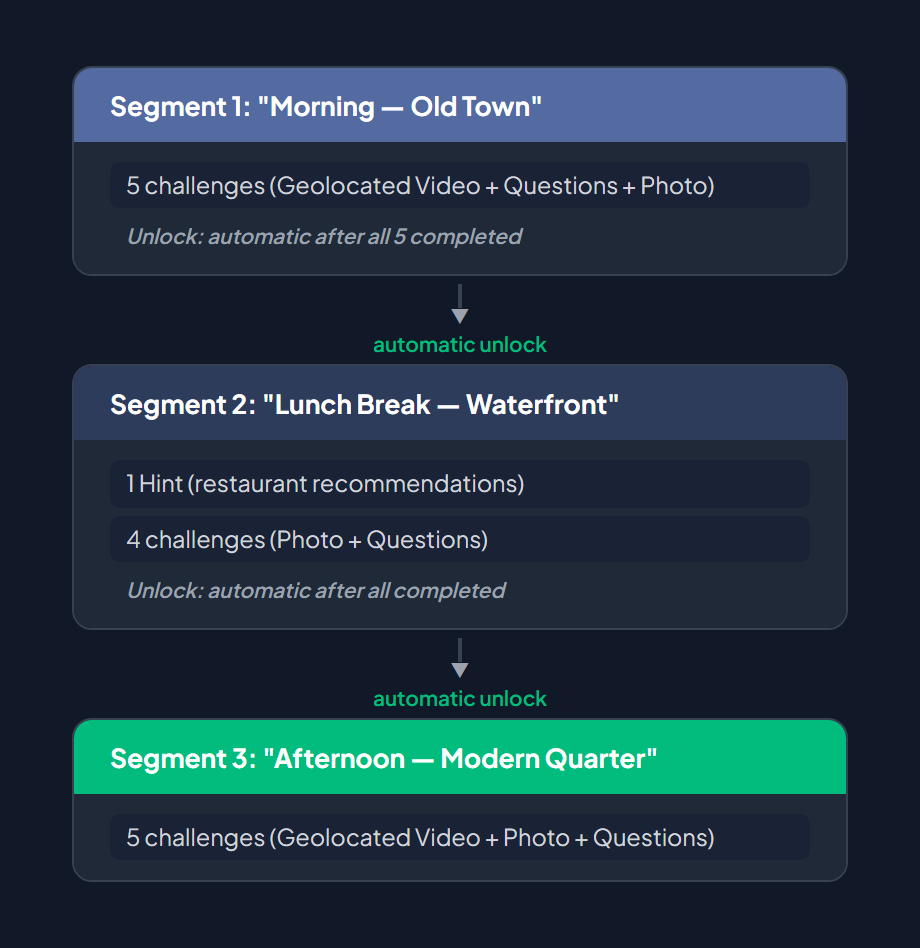
Segments: rest break design
Section titled “Segments: rest break design”Divide the tour into 2–3 segments:
Why it works
Section titled “Why it works”- The route IS the experience. GPS-triggered challenges ensure teams physically visit each landmark.
- Mixed media keeps attention. Video narration at key stops, photo challenges for engagement, quiz questions for retention.
- Objects add a collection goal. The passport mechanic gives teams a tangible progress indicator beyond just points.
- Segments prevent exhaustion. Breaking a 3-hour tour into phases with clear transitions keeps energy high.
Configuration tips
Section titled “Configuration tips”- Set activation distance to 20–30 meters for urban environments where GPS may drift near tall buildings.
- Use Geolocated Video for narration — it has a simplified form with no scoring, which is appropriate for informational content.
- Upload high-quality guide videos to the gallery before creating the challenges.
- If running multiple groups simultaneously, create 2–3 routes that cover different neighborhoods to avoid crowding at the same location.
Recipe 3 — The Competitive Chase
Section titled “Recipe 3 — The Competitive Chase”Use case: Marketing activations, corporate competitions, large-group events with a competitive edge.
Setup summary
Section titled “Setup summary”| Parameter | Value |
|---|---|
| Event mode | Classic (outdoor, GPS-based) |
| Challenge count | 10–14 challenges |
| Estimated duration | 1.5–2 hours |
| Difficulty | High — time pressure, PvP gadgets, fast-paced |
| Teams | 10–30 teams of 2–4 people |
| Gadgets | Bomb + Lock Screen, stock 3–5 per team |
| Objects | None (keep focus on competition, not collection) |
| Segments | Single segment (all challenges available from the start) |
| Routes | 2–3 parallel routes to spread teams across the area |
| Alliances | Optional — group teams into 2–4 factions for alliance ranking |
Challenge mix
Section titled “Challenge mix”| Type | Count | Purpose |
|---|---|---|
| Robots | 2–3 | Set behavior to Escape (Thief). Teams chase a virtual character across the map. Speed: 5–8 km/h. Area: 150–300 meters. This creates dynamic movement and excitement. |
| Puzzle | 2–3 | Jigsaw puzzles using branded images. Time-based scoring rewards speed. Use 3–4 pieces for a quick game, or 6+ for a harder challenge. |
| Guess the Word | 2–3 | Hidden words related to the event theme or sponsor brand. Keep words to 5–8 letters for fast rounds. Easy mode reveals the letter keyboard; Hard mode does not. |
| Slot Machine | 2 | Random-bonus challenges that add a luck element. Use branded images on the reels (2–8 images). Matching reels award bonus points. |
| Questions | 2–3 | Rapid-fire knowledge questions about the brand or event theme. Short time limits (30–60 seconds) add pressure. |
Gadget strategy
Section titled “Gadget strategy”Create two gadgets for this recipe:
| Gadget | Effect | Stock per team | Purpose |
|---|---|---|---|
| Bomb | Triggers a bomb animation on the target device | 3–5 | Disruptive but short-lived — used to break concentration during a challenge |
| Lock Screen | Temporarily locks the target team’s screen | 3–5 | The most powerful sabotage tool — prevents the target team from interacting for several seconds |
Routes: parallel competition
Section titled “Routes: parallel competition”Create 2–3 routes with overlapping challenge pools:
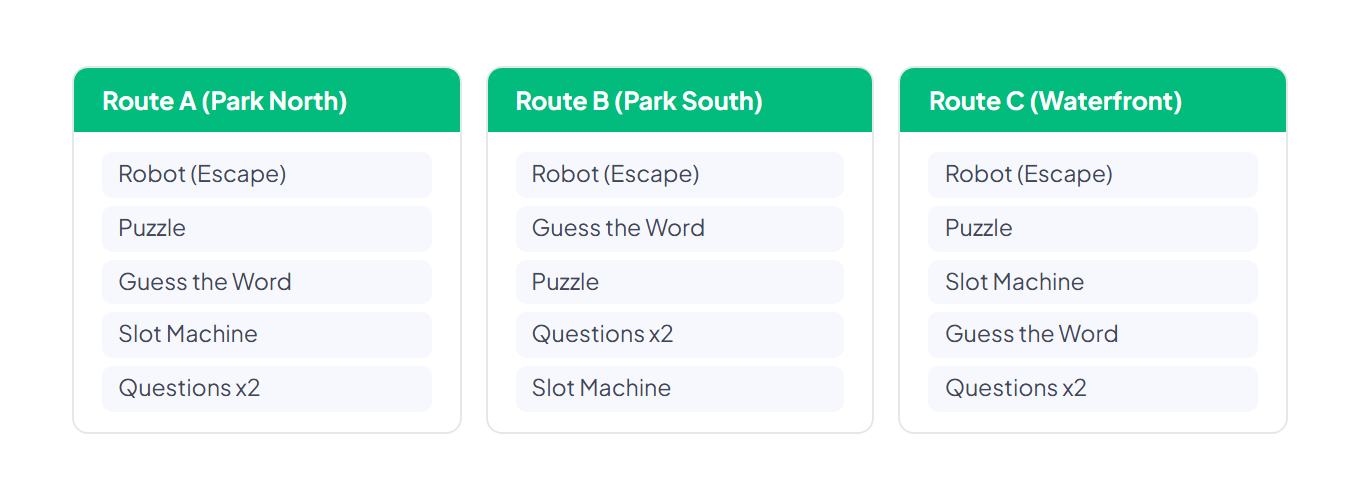
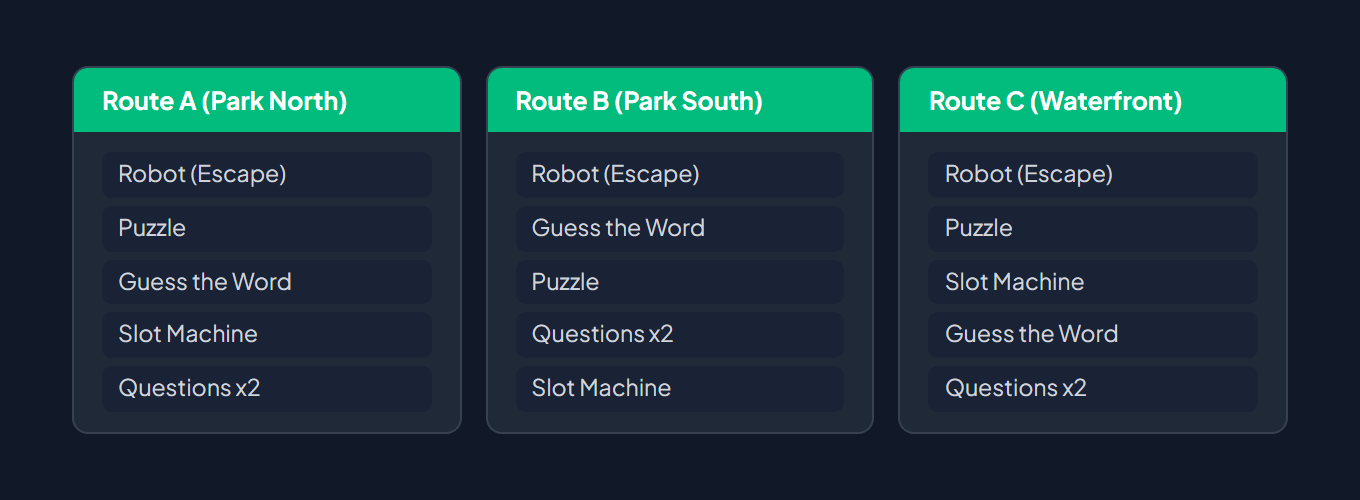
Parallel routes ensure teams are spread across the area while facing equivalent challenge difficulty. All teams compete on the same global ranking.
Alliances (optional)
Section titled “Alliances (optional)”For events with 20+ teams, create 2–4 alliances (e.g., “Red Faction,” “Blue Faction”). Allied teams share a combined score, which encourages both intra-alliance cooperation and inter-alliance rivalry. This is especially effective for corporate events where departments compete against each other.
Why it works
Section titled “Why it works”- Robots create movement. Escape-behavior robots force teams to physically chase targets, generating energy and spectacle for bystanders.
- Gadgets add PvP tension. The Bomb and Lock Screen effects are disruptive enough to matter but short enough not to frustrate. Limited stock prevents spam.
- Mixed challenge types prevent monotony. Puzzle, word games, quiz questions, and luck (Slot Machine) mean different team members can contribute their strengths.
- Parallel routes prevent bottlenecks. With 30 teams, a single route would create congestion. Multiple routes maintain the competitive pace.
Configuration tips
Section titled “Configuration tips”- Robot speed of 5–8 km/h is fast enough to require jogging but not so fast that catching is impossible. Set the area to 150–300 meters to keep the chase zone manageable.
- For the Slot Machine, select 4–6 distinct branded images so players can tell reels apart at a glance.
- Set the time limit on Questions challenges to 30–60 seconds to maintain time pressure.
- Use extra points (1st/2nd/3rd bonus) on key challenges to reward the fastest teams.
Choosing a recipe
Section titled “Choosing a recipe”| Factor | Icebreaker | City Explorer | Competitive Chase |
|---|---|---|---|
| Setting | Indoor / small outdoor | City / outdoor tour | Park / urban outdoor |
| Group size | 4–8 teams | 6–20 teams | 10–30 teams |
| Duration | 45–60 min | 2–3 hours | 1.5–2 hours |
| Skill level | Beginner | Intermediate | Advanced |
| Competition | Low (cooperative) | Medium (collection) | High (PvP) |
| Requires GPS | No (QR/iBeacon) | Yes | Yes |
| Gadgets | No | No | Yes |
| Objects | No | Yes (passport) | No |
Related pages
Section titled “Related pages”- Game Mechanics — Core mechanics reference (GPS, scoring, routes, segments, gadgets)
- Challenge Types Overview — Full list of 14 challenge types
- Event — Objects / Gadgets — Gadget effects, stock management, and strategy tips
- Event — Routes — Route design and team assignment
- Event — Segments — Progression and segment unlock logic
- Event — Alliances — Alliance ranking and team grouping
- Event — Challenges — Challenge management and common fields