

Geolocated Video
What it does
Section titled “What it does”The Geolocated Video challenge plays a video automatically when the team arrives at a specific GPS location. It is a passive, narrative challenge — the player watches the video and the challenge completes. This type has a simplified form with fewer fields than other types.
Requirements
Section titled “Requirements”| Requirement | Value |
|---|---|
| Role | Agency or Admin |
| Event state | Event must be stopped |
Player experience
Section titled “Player experience”- The team approaches the GPS location.
- When within the activation distance, the video plays automatically on the device.
- The challenge is marked as complete after viewing.
- No interaction or answer is required.
Geolocated Video challenge creation form
Section titled “Geolocated Video challenge creation form”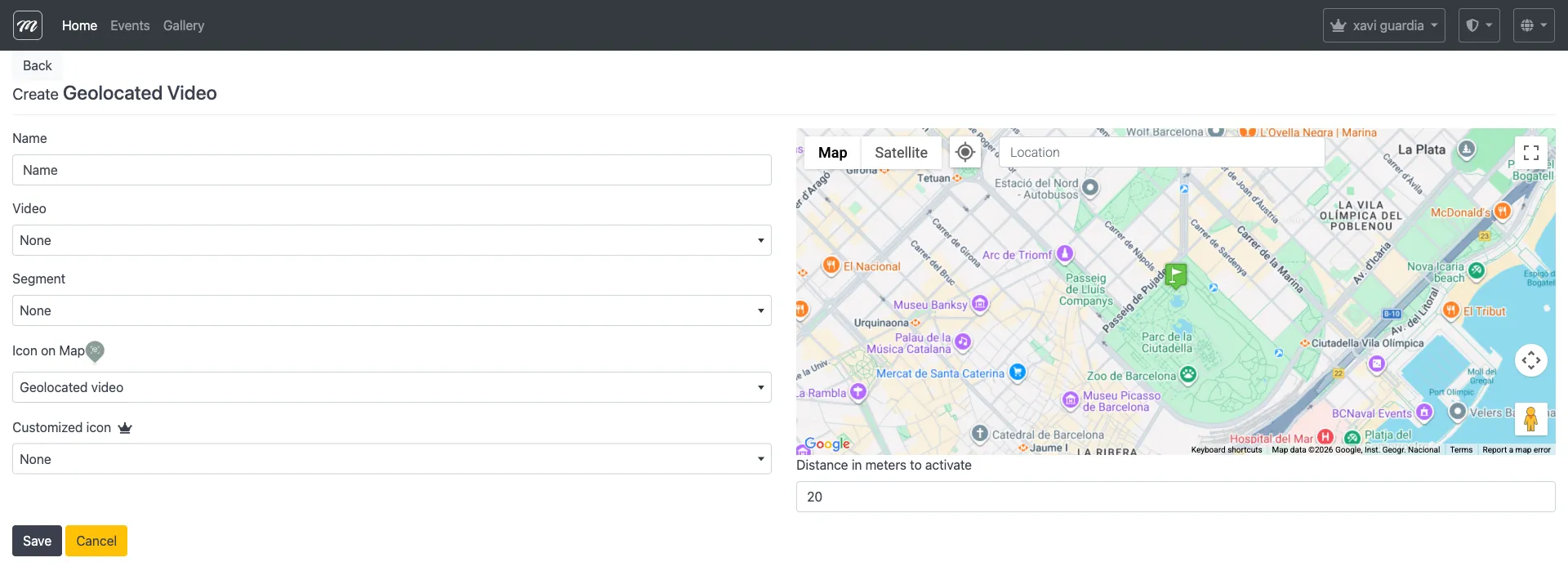
Fields
Section titled “Fields”Geolocated Video has a completely different form from other types — it does not use the standard common fields. The form contains only:
| Field | Type | Description | Required |
|---|---|---|---|
| Name | Text | Challenge display name | Yes |
| Location | Text | Location name or address (geocoded) | Yes |
| Distance in meters to activate | Text | GPS proximity threshold to trigger the video | Yes |
| Video | Select | Video character from the gallery | Yes |
| Segment | Select | Segment this challenge belongs to | No |
| Icon on Map | Select | Predefined map pin icon | No |
| Customized icon | Select | Custom icon from the gallery | No |
Fields NOT present
Section titled “Fields NOT present”Unlike other types, Geolocated Video does not have:
- Activation checkboxes (no QR, iBeacon, code, or selectable options)
- Scoring fields (no points, extra points, or time limit)
- Hide reward checkbox
- Emergency activation
- Change to segment on completion
- Introductory text or AR scene selectors
Behavior and rules
Section titled “Behavior and rules”- This type is purely GPS-triggered — the only activation method is physical proximity.
- No scoring — the video plays and the challenge completes without points.
- Upload the video to the gallery first, then select it from the dropdown.
- Ideal for guided tours, storytelling, and immersive location-based narratives.