

Robots
What it does
Section titled “What it does”The Robots challenge creates virtual characters that move around the event map. Teams must physically chase, evade, or interact with these robots. The robot has a defined speed, movement area, and behavior pattern. This is one of the most unique challenge types — it turns the event into a dynamic chase game.
Requirements
Section titled “Requirements”| Requirement | Value |
|---|---|
| Role | Agency or Admin |
| Event state | Event must be stopped |
Player experience
Section titled “Player experience”- The robot appears on the team’s map at its configured location.
- The robot moves within its defined area at its configured speed.
- Depending on the behavior type:
- Hunt / Police: The robot chases the team — the team must evade.
- Escape / Thief: The robot runs away — the team must chase and catch it.
- Zombie Hunts: The robot hunts aggressively — a more intense variant.
- The team earns points by successfully interacting (catching or evading) within the activation distance.
Robots challenge creation form
Section titled “Robots challenge creation form”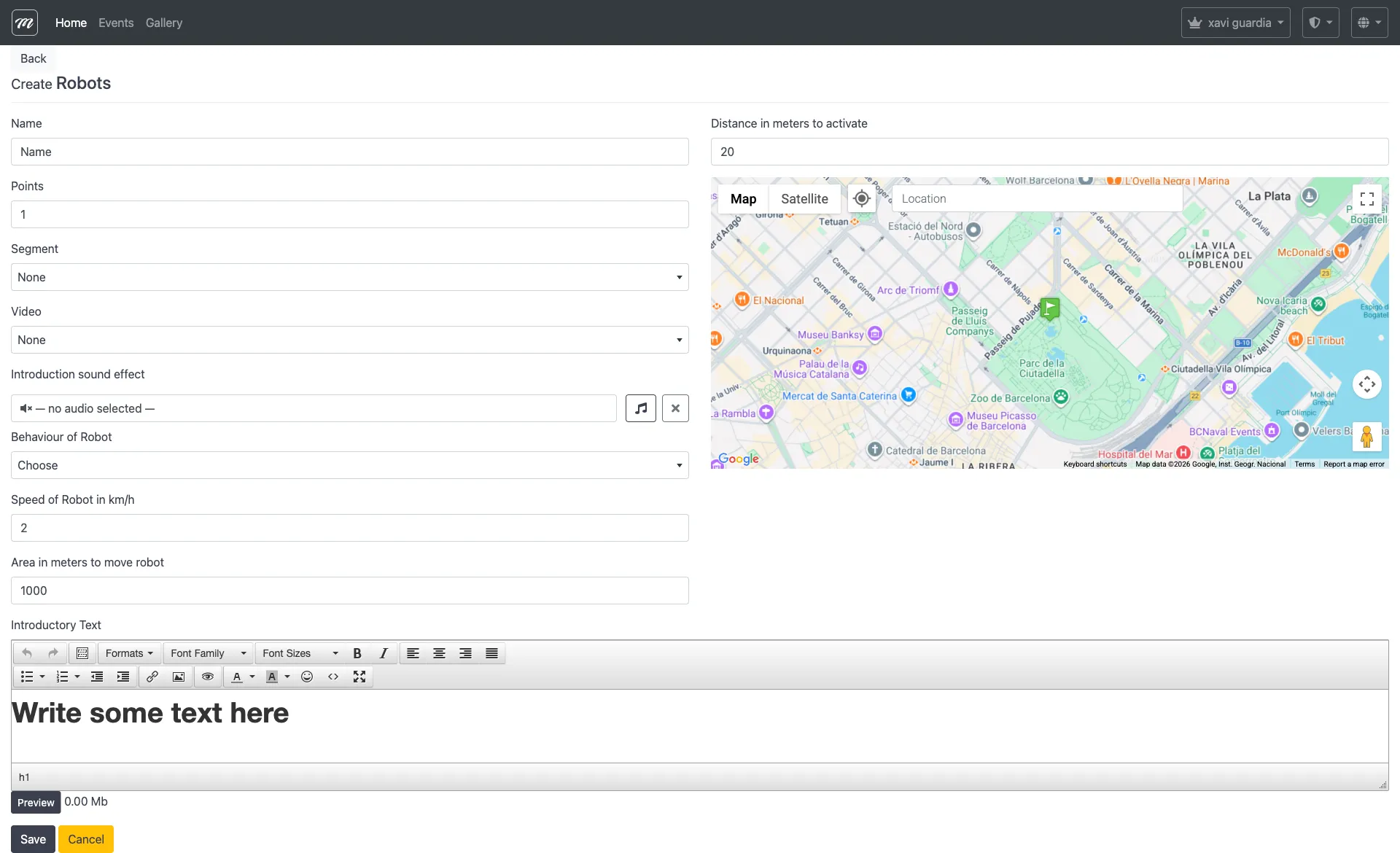
Fields
Section titled “Fields”Robots has a completely different form from other types. It does not use the standard common fields (no activation checkboxes, no map appearance options, no scoring extras). The form contains:
| Field | Type | Description | Required |
|---|---|---|---|
| Name | Text | Robot display name | Yes |
| Points | Text | Points awarded for successful interaction | Yes |
| Speed of Robot in km/h | Text | How fast the robot moves on the map | Yes |
| Area in meters to move robot | Text | Radius of the robot’s movement zone around its location | Yes |
| Distance in meters to activate | Text | How close the team must be to interact with the robot | Yes |
| Location | Text | Central location of the robot’s movement area | Yes |
| Segment | Select | Segment the robot is active in | No |
| Video | Select | Visual character/avatar for the robot — video characters from the gallery | No |
| Behaviour of Robot | Select | Movement and interaction pattern | Yes |
Behaviour options
Section titled “Behaviour options”| Behaviour | Description |
|---|---|
| Hunt | The robot actively chases the nearest team |
| Escape | The robot runs away from approaching teams |
| Zombie Hunts! | Aggressive chase mode — faster pursuit |
| Police (hunts you) | Authority figure that pursues teams |
| Thief (escapes from you) | Criminal character that teams must catch |
Behavior and rules
Section titled “Behavior and rules”- Robots move autonomously on the map using GPS calculations within their defined area.
- The speed determines how fast the robot icon moves — higher speeds make the robot harder to catch (Escape/Thief) or harder to evade (Hunt/Police/Zombie).
- The area defines the boundary — the robot won’t leave this circle. Set a larger area for more dynamic gameplay.
- The activation distance determines how close the team must be to trigger the interaction. Smaller distances require more precise positioning.
- The robot’s visual appearance is set by the Video character — this is the avatar shown on the map, selected from the gallery.
- Robots appear in routes like other challenges and follow the same ordering rules.
Characters
Section titled “Characters”Every Robot challenge needs a character — the visual avatar that appears on the map and represents the robot to players. Characters are managed separately from challenges because they are company-level resources shared across all events, not tied to a single event.
The UI labels this section “Personajes” (Spanish for “characters”).
How to access
Section titled “How to access”Admin area → Characters (shown as “Personajes” in the UI)
Character list
Section titled “Character list”The index page shows all characters for your company in a table with their names.
Create character
Section titled “Create character”| Field | Type | Description | Required |
|---|---|---|---|
| Name | Text | Character display name | Yes |
| Video file | File upload | MP4 video file representing the character | Yes |
| Public | Checkbox | Whether the character is visible to other companies | No |
| Published | Checkbox | Whether the character is active | No |
The file must be a video (MP4 format recommended). Size limits: 5 MB for standard accounts, 25 MB for premium accounts.
Edit character
Section titled “Edit character”Same fields as create, with current values pre-filled. The video upload is optional during editing — leave it blank to keep the existing video.
Delete character
Section titled “Delete character”Deletes the character record and its associated video file from the server. A confirmation dialog is shown before deletion.
Related pages
Section titled “Related pages”- Challenge Types Overview
- Event — Challenges
- Event — Routes — Where robots are ordered within routes