

User Menu — My Data
What it does
Section titled “What it does”The My Data section contains all account-level information: company details, fiscal data, customer credit transactions, payment history (liquidaciones), and user management. It is organized into five tabs.
Requirements
Section titled “Requirements”| Requirement | Details |
|---|---|
| Role | Any authenticated user for viewing; Admin or Agency role required for user association and discount code features |
How to access
Section titled “How to access”User dropdown (top-right) → My Data
My Data page
Section titled “My Data page”
The landing tab shows the user and company name at the top (“{username} / Empresa de {username}” — “Company of {username}”) and provides navigation to all other tabs.
My Account
Section titled “My Account”Displays account information and provides access to fiscal data management.
| Action | Description |
|---|---|
| Tax Information (Información Fiscal) | Opens the fiscal data form to view or edit company tax details |
Use the fiscal data form to edit tax-related fields for invoicing. Changes are saved and linked to your company account.

Customer
Section titled “Customer”Shows a detailed table of all credit transactions for the company, with the full transaction history.
| Column | Description |
|---|---|
| Date | Transaction date |
| Concept | Description of the transaction (e.g., “Event Reprovisionada Crédito…”) |
| Event | Associated event name |
| Amount | Credit quantity (positive = added, negative = consumed) |
The table can contain many rows depending on your transaction history. Actions available:
| Action | Description |
|---|---|
| Redeem Discount Code (Canjear Código Descuento) | Enter a promotional code to receive credits |
Payments
Section titled “Payments”Displays the invoice/settlement history (Liquidaciones) for the company.
| Column | Description |
|---|---|
| Fecha (Date) | Settlement date |
| Importe (Amount) | Settlement amount |
| Pagada (Paid) | Whether the settlement has been paid (yes/no) |
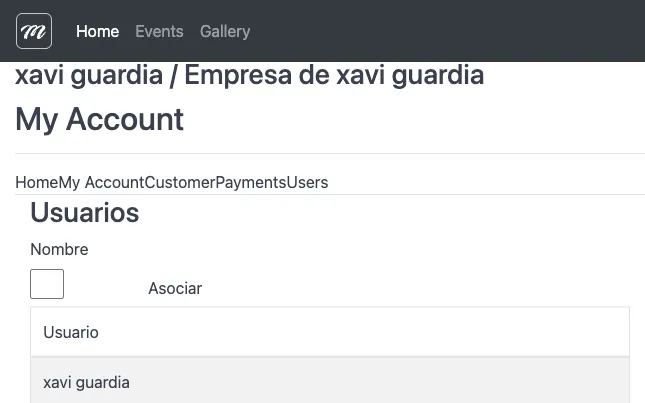
Manage users associated with your company account. Shows the list of current users and allows you to associate new ones.
| Field | Type | Description | Required |
|---|---|---|---|
| Nombre (Name) | Text | Username to associate with this company | Yes |
| Action | Description |
|---|---|
| Asociar (Associate) | Link the entered username to this company account |
The users table lists all users currently associated with the company (e.g., “xavi guardia”, “xavig2”).
Behavior and rules
Section titled “Behavior and rules”- The “Associate User” action validates that the username exists in the system. If it doesn’t, an error is shown.
- The discount code redemption validates the code exists, hasn’t been used, and hasn’t expired (24-hour validity). If valid, the company is linked to the code’s representative.
- Roles required: Admin or Agency for user association and discount code features.
- Credit transactions displayed in the Customer tab correspond to the same data shown in Credits.