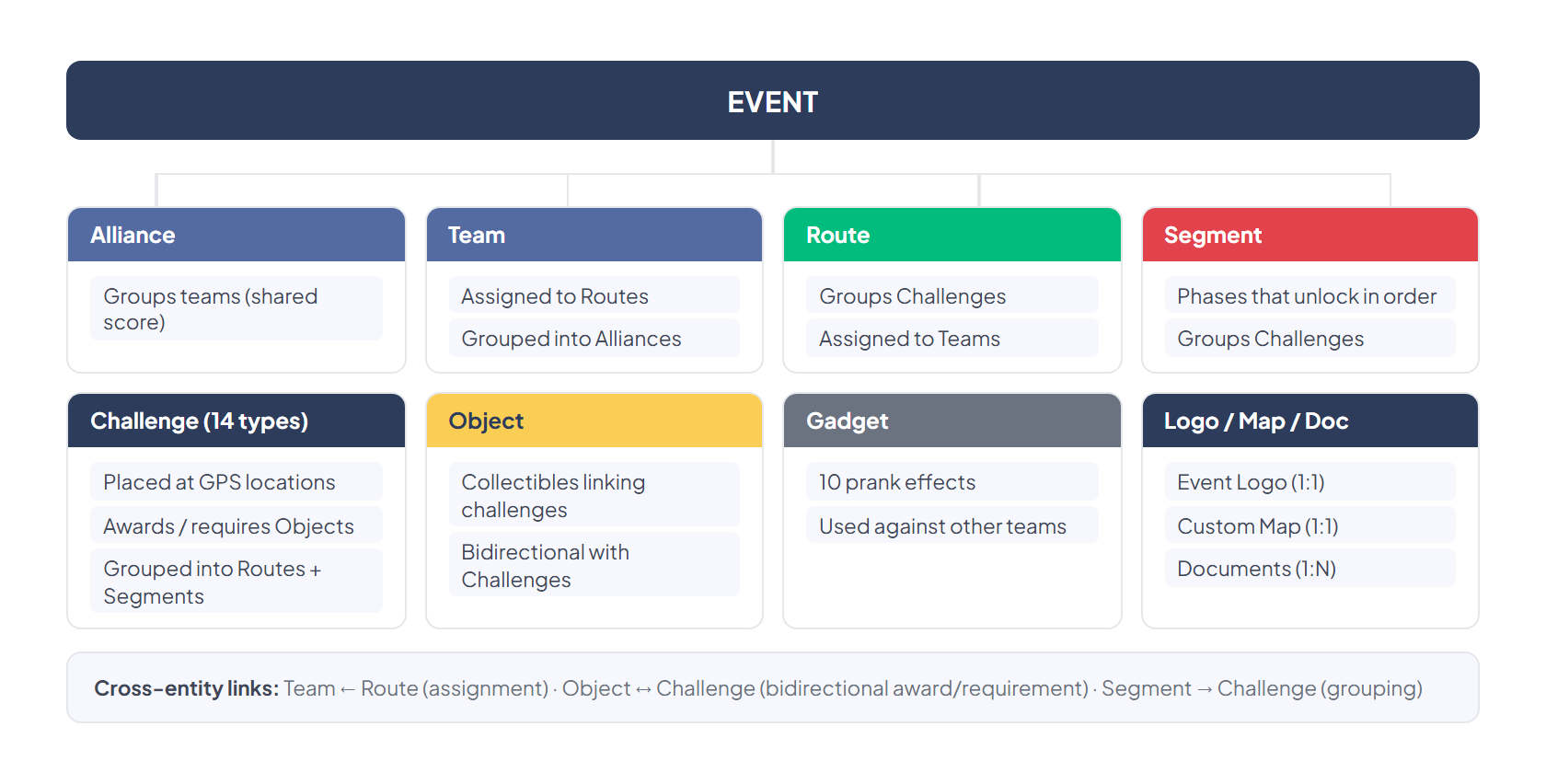
Event Components
The root element of the platform. An event is a complete gamified activity that contains teams, challenges, routes, and geolocated objects.
Event Properties
Section titled “Event Properties”| Property | Description |
|---|---|
| Name | Name of the event |
| Number of Teams | Number of participating teams |
| Duration | Game duration in days |
| Location | Central location on the map (Google Maps) |
| Theme | Visual theme that changes icons, sounds, and the app’s style |
| Pad background color | iPad background color |
Game Options
Section titled “Game Options”| Option | Effect |
|---|---|
| Allow players to click map icons to activate challenges | Players can activate challenges by tapping icons on the map |
| Don’t allow users to switch segment | Prevents players from switching segments manually |
| Enable custom point labeling | Allows custom labels on map points |
| Display rankings exclusively for the active segment | Rankings only show the active segment |
| Hide chat icon on app | Hides the chat icon in the app |
Lifecycle
Section titled “Lifecycle”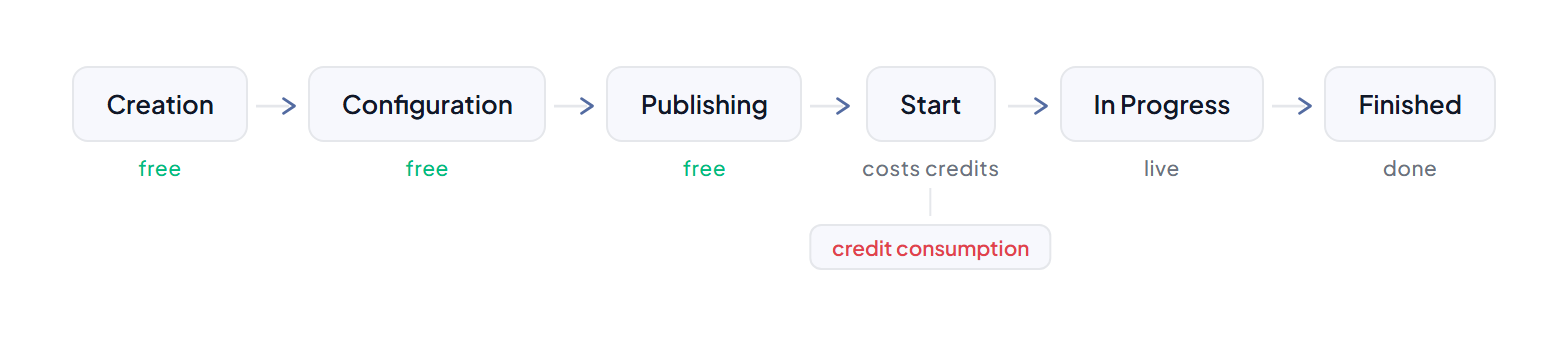
Global Actions
Section titled “Global Actions”| Action | Description |
|---|---|
| Start | Start the event (consumes credits) |
| Publish | Publish the event so that teams can see it |
| Export | Export data and results |
| View on map | View the entire event on the map |
| Back | Return to the event list |
A group of players who participate together in an event.
| Property | Description |
|---|---|
| Number | Team identifier number |
| Name | Team name |
| Email Address | Contact email |
| Alliance | Alliance the team belongs to |
| Route | Route assigned to the team |
| Staff flag | ”This team is Organization Staff” — marks the team as staff |
| Picture | Team photo |
Team Management
Section titled “Team Management”- Import: Import teams from a file
- Send mail: Send an invitation email with an activation link/QR code
- QR Code: Generate QR codes for quick activation
- Export Text Elements: Export team data in text/CSV format
Alliance
Section titled “Alliance”A grouping of teams that cooperate with each other. Teams in an alliance share their score and must cooperate to achieve success.
| Property | Description |
|---|---|
| Name | Alliance name |
| Teams | List of teams that form the alliance |
Typical Use
Section titled “Typical Use”- In large events where cooperation between multiple teams is encouraged
- Creating “super-team” dynamics where groups compete against each other
Challenge
Section titled “Challenge”A challenge is the fundamental unit of gameplay — a task that teams must complete to earn points. MooveTeam supports 14 challenge types (see Challenge Types).
Common Properties
Section titled “Common Properties”| Property | Description |
|---|---|
| Name | Challenge name |
| Question / Description | Question text or instruction |
| Points | Points awarded upon completion |
| Location | GPS coordinates where the challenge is activated |
| Hints | Clues that help solve the challenge |
Challenge Activation
Section titled “Challenge Activation”Challenges can be activated in several ways:
| Method | Description |
|---|---|
| GPS / Geolocation | Upon arriving at the specified coordinates |
| QR Code | By scanning a physical QR code |
| iBeacon | By detecting a Bluetooth beacon (indoor) |
| Map | By tapping the icon on the map (if enabled) |
| Chaining | A challenge can trigger another upon completion |
Advanced Features
Section titled “Advanced Features”- Import Challenges: Import challenges from other existing events
- Multiple Changes: Edit multiple challenges at once (multi-edit)
- Hidden Challenges: Hidden challenges that are discovered during gameplay
A predefined path that groups a set of challenges and is assigned to specific teams. Routes allow different teams to follow different paths within the same event.
| Property | Description |
|---|---|
| Name | Route name (e.g., “Route A”, “Route B”) |
| Teams | Teams assigned to this route |
| Challenges | List of challenges that make up the route |
Typical Use
Section titled “Typical Use”- City events where different teams explore different areas
- Creating multiple difficulty levels
- Preventing all teams from crowding at the same point
Segment
Section titled “Segment”A division of the event into phases or levels. Segments allow creating a progression where teams must complete a group of challenges before advancing to the next level.
| Property | Description |
|---|---|
| Segment | Segment name |
| Order | Display order |
| Challenges | Challenges that belong to this segment |
| Unlock Challenges | Challenges that, once completed, unlock this segment |
Dynamic Segments (Premium)
Section titled “Dynamic Segments (Premium)”Premium accounts can use dynamic segments that unlock automatically based on:
- Completing certain challenges
- Collecting specific objects
- Time-based conditions
Object
Section titled “Object”A virtual collectible item that teams can obtain by completing challenges. Objects can have a 3D representation for augmented reality.
| Property | Description |
|---|---|
| Object name | Name of the object |
| Initial Stock | Initial available quantity |
| Challenges -> | Challenges that grant this object |
| -> Challenges | Challenges that require this object to be activated |
Typical Use
Section titled “Typical Use”- “Keys” that unlock new zones or segments
- Collectible pieces of a larger puzzle
- Resources needed to complete advanced challenges
- AR visualization: objects can be viewed in 3D using the device camera
Gadget
Section titled “Gadget”A strategic tool that teams can use during the game to affect other teams. Gadgets are pranks that delay or hinder the progress of rivals.
| Property | Description |
|---|---|
| Gadget name | Name of the gadget |
| Initial Stock | Initial quantity per team |
| Kind of gadget | Dropdown that selects the gadget effect (see table below) |
| This gadget can be picked up | Checkbox that determines whether teams can collect this gadget |
| Auto | Automatic assignment |
Gadget Effects
Section titled “Gadget Effects”The Kind of gadget dropdown offers 10 possible effects:
| Effect | Description |
|---|---|
| Bomb | Triggers a bomb animation on the target device |
| Drunk Screen | Distorts the target team’s screen as if intoxicated |
| X Rays | Applies an X-ray visual filter to the target screen |
| Scaring Ghost | Displays a scare/jump-scare effect on the target device |
| Fart | Plays a fart sound on the target team’s device |
| Love | Displays a love/hearts animation on the target screen |
| Fireworks | Displays a fireworks animation on the target screen |
| Broken Screen | Simulates a cracked/broken screen on the target device |
| Inverted Screen | Flips the target team’s screen upside-down |
| Lock Screen | Temporarily locks the target team’s screen |
Difference Between Objects and Gadgets
Section titled “Difference Between Objects and Gadgets”| Objects | Gadgets | |
|---|---|---|
| Purpose | Game progression | Competition between teams |
| Effect | Unlock challenges/segments | Hinder other teams |
| AR | Can have 3D visualization | No AR component |
| Direction | Benefit the owning team | Affect rival teams |
Custom Map
Section titled “Custom Map”An image overlaid on Google Maps to create a themed appearance.
| Use | Example |
|---|---|
| Themed events | Map with medieval, pirate, or other themed aesthetics |
| Escape games | Clue map with detective-style aesthetics |
| GPX Track | Hiking trail or route overlay |
Visual customization of the event in the app.
| Type | Recommended Size | Location |
|---|---|---|
| Event Logo | 512 x 512 px | Main event screen |
| Custom Logo | 211 x 70 px | Bottom of the iPad |
Document
Section titled “Document”Files attached to the event that can be downloaded by participants or staff.
How components relate
Section titled “How components relate”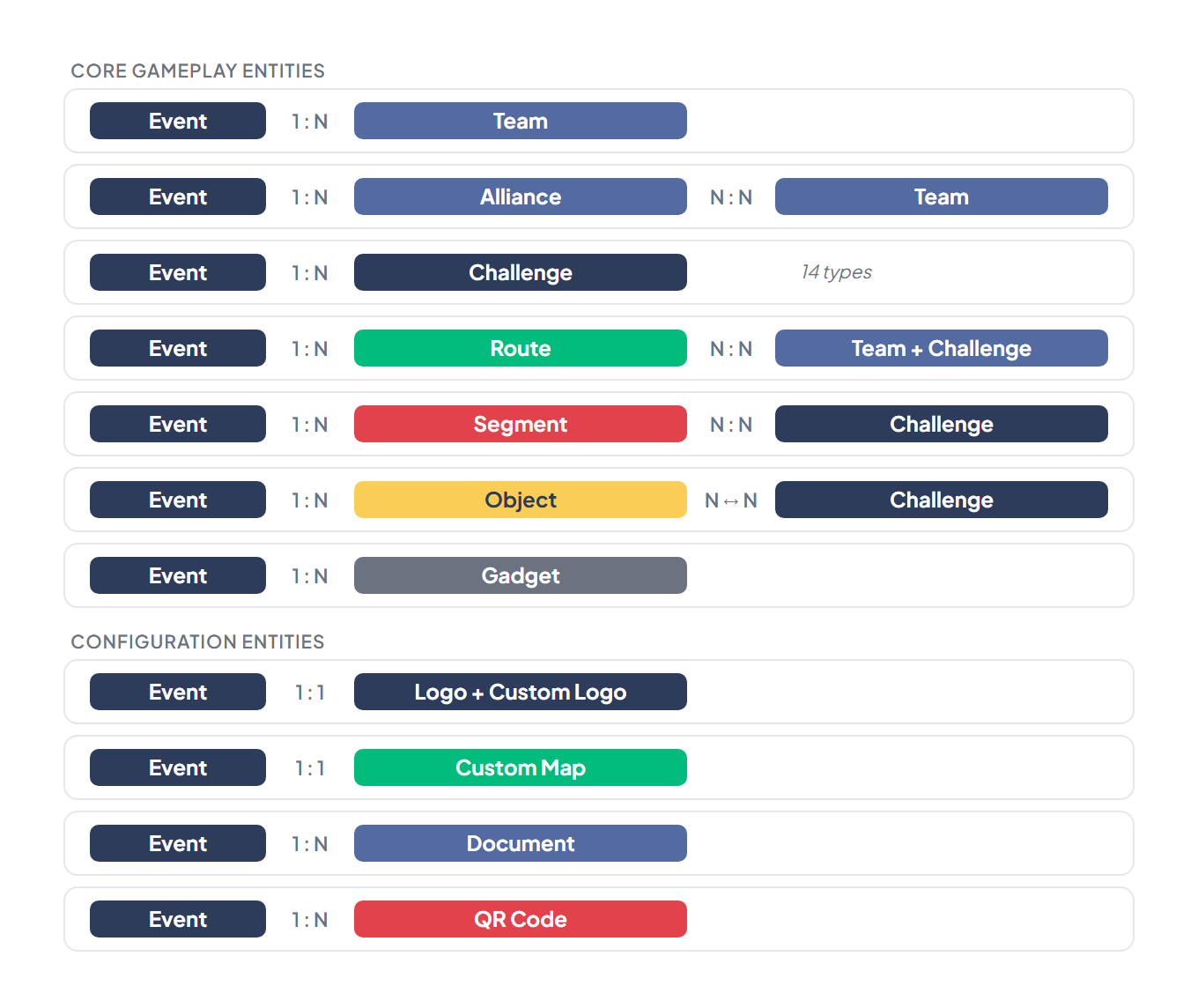
Visual Diagram
Section titled “Visual Diagram”