Challenge Types
Type Summary
Section titled “Type Summary”| # | Type | Category | Brief Description |
|---|---|---|---|
| 1 | Questions | Knowledge | Multiple-choice questions (up to 6 options, A through F) |
| 2 | Hints | Narrative | Informational clues or text with no scoring |
| 3 | Physical Activity | Physical activity | Challenges that require physical movement |
| 4 | Picture/Video Point | Creativity | Photo or video capture as proof |
| 5 | Geolocated Video | Multimedia | Geolocated video that plays on arrival |
| 6 | Mini Game: Puzzle | Mini-game | Image jigsaw puzzle |
| 7 | Mini Game: Guess the word | Mini-game | Guess a hidden word (hangman is a player-app variant) |
| 8 | Mini Game: Find the pairs | Mini-game | Memory card-matching game |
| 9 | Mini Game: Related words | Mini-game | Find related words |
| 10 | Mini Game: Slot machine | Mini-game | Interactive slot machine |
| 11 | Mini Game: AR Shell | Mini-game | Augmented reality game |
| 12 | Guess the song | Multimedia | Identify a song by its audio |
| 13 | Robots | Interaction | Challenges involving robotic interaction |
| 14 | Prizes | Reward | Slot-machine-style spin to win virtual prizes |
Real-World Example: A Typical Corporate Scavenger Hunt
Section titled “Real-World Example: A Typical Corporate Scavenger Hunt”A typical corporate scavenger hunt might use the following challenge distribution:
| Type | Count |
|---|---|
| Questions | 30-40 |
| Hints | 5-10 |
| Picture/Video Point | 10-15 |
| Mini-games | 5-10 |
Detail by Type
Section titled “Detail by Type”1. Questions
Section titled “1. Questions”Multiple-choice knowledge questions.
| Property | Detail |
|---|---|
| Format | Question + up to 6 options (A through F) |
| Scoring | Configurable per question |
| Answer type | Multiple choice and free text |
| Typical use | Cultural trivia, company quizzes, themed questionnaires |
Variants:
- Multiple answers: Several correct options possible
- Free text: Free-text answer compared against the correct one
2. Hints
Section titled “2. Hints”Informational or narrative content that does not require an answer.
| Property | Detail |
|---|---|
| Format | Text, images, videos, or 360-degree scenes |
| Scoring | Generally no points (informational) |
| Typical use | Providing context, telling a story, giving instructions |
Hints can include:
- Rich text
- Images
- Videos
- Immersive 360-degree scenes
3. Physical Activity
Section titled “3. Physical Activity”Challenges that involve physical movement or action by the team.
| Property | Detail |
|---|---|
| Format | Instruction + validation (photo/video or automatic) |
| Typical use | Team exercises, dances, group poses |
4. Picture/Video Point
Section titled “4. Picture/Video Point”The team must capture a photo or record a video as proof of completing a challenge.
| Property | Detail |
|---|---|
| Format | Instruction + multimedia capture |
| Validation | Manual (staff review) or automatic |
| Typical use | Selfies at landmarks, creative videos, documenting findings |
Ideal for:
- Encouraging team creativity
- Creating multimedia content for the event
- Verifying that the team was at the location
5. Geolocated Video
Section titled “5. Geolocated Video”A video that plays automatically when the team arrives at a specific location.
| Property | Detail |
|---|---|
| Format | Video + GPS coordinates for activation |
| Activation | Automatic upon arriving at the location |
| Typical use | Immersive storytelling, narrative clues, venue presentations |
Ideal for:
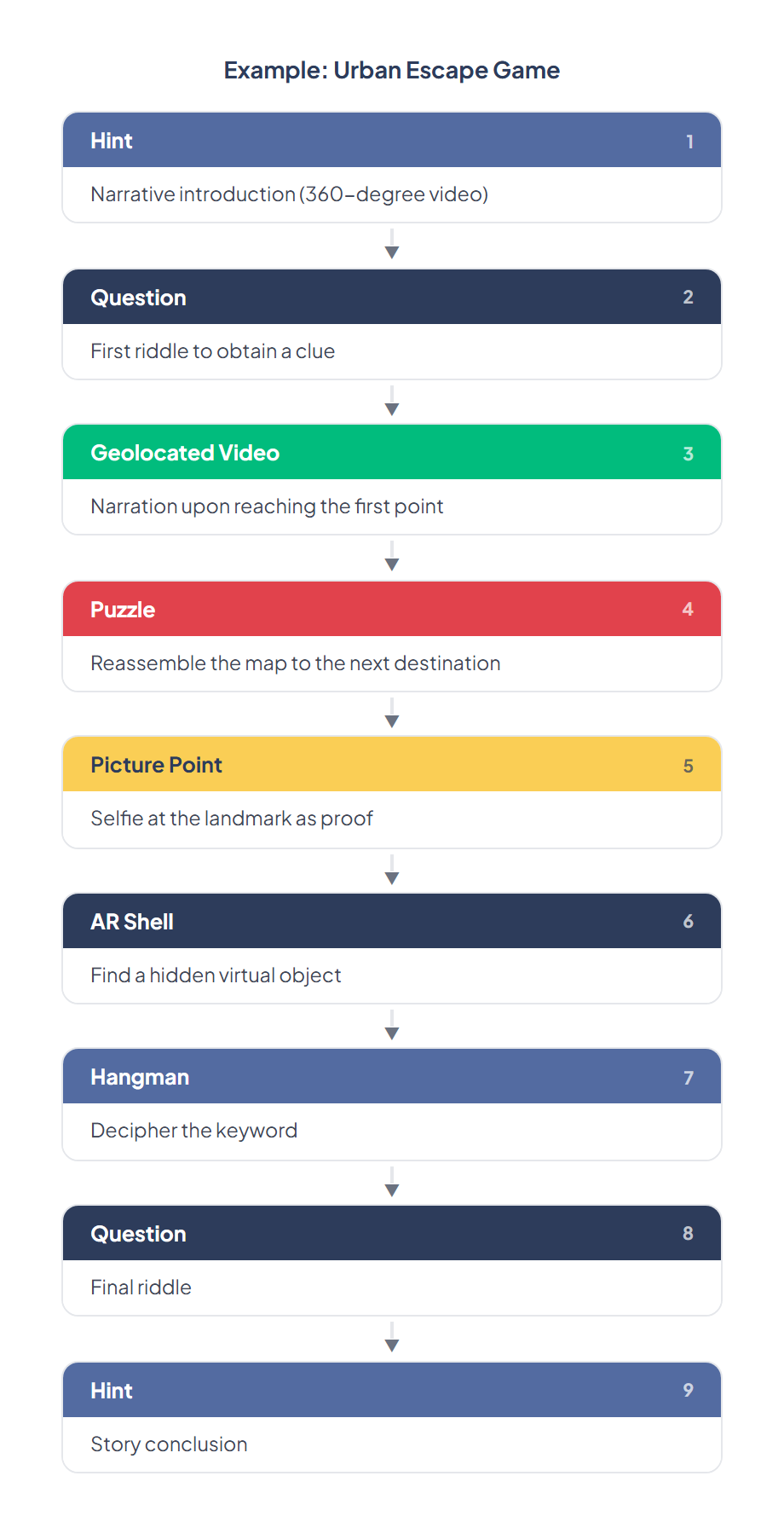
- Urban escape games with a narrative
- Guided tours with audiovisual content
- Educational experiences at points of interest
6. Mini Game: Puzzle
Section titled “6. Mini Game: Puzzle”A jigsaw puzzle where the team must reassemble an image.
| Property | Detail |
|---|---|
| Format | Image split into pieces |
| Difficulty | Configurable (number of pieces) |
| Typical use | Visual challenges, reconstructing logos, maps |
7. Mini Game: Guess the word
Section titled “7. Mini Game: Guess the word”Guess a hidden word using clues.
| Property | Detail |
|---|---|
| Format | Hidden word + progressive clues |
| Typical use | Vocabulary, key concepts, place names |
8. Mini Game: Find the pairs
Section titled “8. Mini Game: Find the pairs”A memory game where players must match identical cards.
| Property | Detail |
|---|---|
| Format | Board of face-down cards |
| Typical use | Memorization, concept association, branding |
9. Mini Game: Related words
Section titled “9. Mini Game: Related words”Find words that are related to each other.
| Property | Detail |
|---|---|
| Format | Set of words to group by relationship |
| Typical use | Idea association, categorization, learning |
10. Mini Game: Slot machine
Section titled “10. Mini Game: Slot machine”An interactive slot machine as a game mechanic.
| Property | Detail |
|---|---|
| Format | Slot-style reel mechanic |
| Typical use | Element of luck, random rewards |
11. Mini Game: AR Shell
Section titled “11. Mini Game: AR Shell”A game that uses the device camera to display virtual elements in the real world.
| Property | Detail |
|---|---|
| Format | AR experience using the camera |
| Requirement | AR-compatible device |
| Typical use | Finding virtual objects, interacting with the environment |
12. Guess the song
Section titled “12. Guess the song”The team listens to an audio clip and must identify the song.
| Property | Detail |
|---|---|
| Format | Audio + answer options |
| Typical use | Musical entertainment, themed quizzes |
13. Robots
Section titled “13. Robots”Challenges that involve interaction with robots or automated elements.
| Property | Detail |
|---|---|
| Format | Interaction with a programmed robot |
| Typical use | Technology events, innovation activities |
14. Prizes
Section titled “14. Prizes”A slot-machine-style reward challenge where teams spin to win virtual prizes.
| Property | Detail |
|---|---|
| Format | Slot machine spin with configurable prize items and probabilities |
| Scoring | Points or items awarded based on the spin result |
| Typical use | Reward checkpoints, lucky draws, bonus challenges |
Multimedia Properties of Challenges
Section titled “Multimedia Properties of Challenges”All challenges can be enriched with multimedia content:
| Element | Formats |
|---|---|
| Images | Photos, illustrations, infographics |
| Videos | Instructional, narrative, or clue clips |
| 3D Models | Objects in glb/gltf format for AR |
| Audio | Sound clips, songs, effects |
| 360-degree scenes | Immersive panoramas |
Combining Challenges
Section titled “Combining Challenges”Challenges can be combined within a single event to create rich experiences: