

The Platform
Three pieces, one workflow
Section titled “Three pieces, one workflow”Everything in MooveTeam revolves around three components:
-
MooveTeam CMS — the back-office. A website where you design events, manage teams, and monitor live gameplay. You open it in your browser and log in with your credentials.
-
MooveXR — the player app for staffed events. A phone or tablet app (iOS and Android) that shows the map, displays challenges, tracks GPS, and supports augmented reality. Players install it before the event or scan a QR code you provide. On-site staff also use MooveXR to monitor and evaluate teams during the event.
-
MooveGoXR — the player app for self-guided experiences. Participants join via a link and play at their own pace — no staff needed.
Your job lives in MooveTeam CMS. You design the experience there, then participants play it on their devices.
How an event flows
Section titled “How an event flows”This is the complete lifecycle, from your perspective:
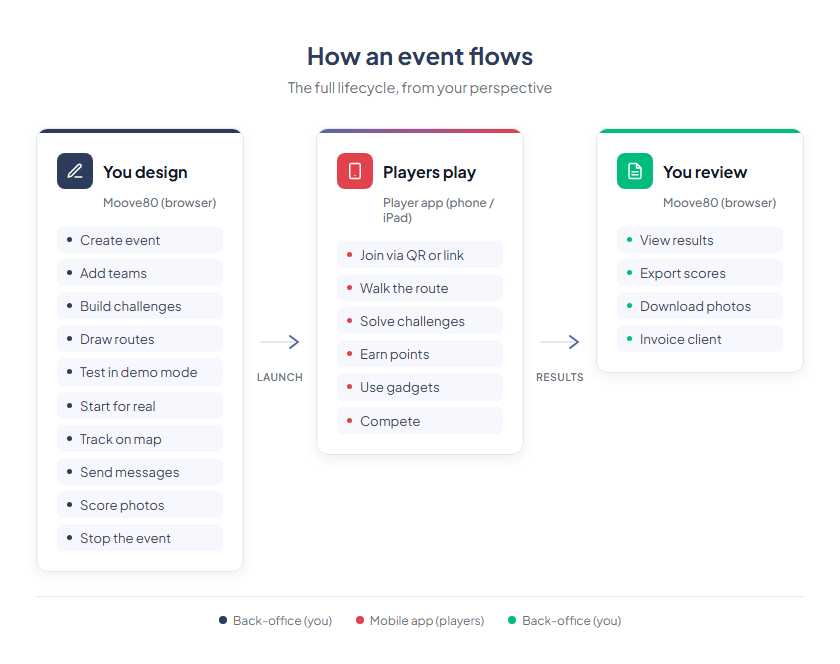
Everything on the left and right happens in MooveTeam CMS. Everything in the middle happens on the player’s device. You never need to touch the player app yourself (unless you want to test).
What participants see
Section titled “What participants see”When a player opens the app, they see:
- A map with icons marking challenge locations
- A list of challenges they can attempt
- A leaderboard showing team rankings (MooveGoXR shows a simplified ranking)
- A chat where you can send messages (MooveXR only) — you control this from MooveTeam CMS
When they walk to a challenge location, the challenge activates automatically. They complete it — answer a question, take a photo, solve a puzzle — and earn points.
The products
Section titled “The products”MooveTeam has several products that share the same back-office:
| Product | What it is | Who uses it |
|---|---|---|
| MooveXR | GPS team-building events with on-site staff, augmented reality, gadgets, and real-time chat | Event agencies, team-building companies |
| MooveGoXR | Self-guided GPS experiences, no staff needed | Tourism companies, self-service city tours, education |
Both apps are managed from the same MooveTeam CMS back-office. MooveXR works on both phones and tablets — organizers often use tablets for on-site staff evaluation.
Credits — how pricing works
Section titled “Credits — how pricing works”Creating events is free. Testing them is free. You only pay when you run an event with real participants.
The currency is credits:
- 1 credit = 1 playing team per event
- A team of 5 people sharing one tablet = 1 credit
- In BYOD mode (each player on their own phone), each device counts as a team = 1 credit per device
- You purchase credits in advance, and they never expire
- Larger packs cost less per credit
Cost summary:
| Action | Cost |
|---|---|
| Create an event | Free |
| Edit and configure it | Free |
| Run it in demo mode | Free (limited to 2 teams) |
| Run it with real participants | 1 credit per playing team |
| Buy more credits | Volume pricing — ask your account manager |
This means you can build your entire event, test it thoroughly in demo mode, and only spend credits when the client is on-site.
User roles
Section titled “User roles”Not everyone sees the same MooveTeam CMS. What you can do depends on your role:
| Role | What you can do |
|---|---|
| Agency | Create and run events, manage teams and challenges, handle sales. This is what most users have. |
| Viewer | See events, teams, and results. Cannot create or change anything. Good for clients who want to observe. |
| Indoor | Access to quiz-mode events only. Redirected to a dedicated event interface. |
If you are reading this manual, you are most likely an Agency user. Everything in this manual is written for that role.
Languages
Section titled “Languages”MooveTeam CMS supports six languages for the back-office interface: English, Spanish, French, Dutch, Polish, and German. You can switch at any time from the login page or the top-right menu.
MooveXR supports 12 player languages: English, Catalan, Dutch, French, German, Italian, Polish, Portuguese, Simplified Chinese, Slovenian, Spanish, and Traditional Chinese. Participants play in their own language regardless of which language you use in the back-office.
Next: Key Concepts — the vocabulary you need before you start building.