

Challenge Types Reference
What it does
Section titled “What it does”MooveTeam CMS supports 14 distinct challenge types that can be combined within a single event to create unique player experiences. Each type defines a different interaction mechanic — from knowledge quizzes and photo tasks to mini-games and GPS-based exploration.
Each type has a dedicated page explaining what the player sees, what you configure, and what each field means.
How to access
Section titled “How to access”Events list → click an event name → Challenges tab → click New → select a type
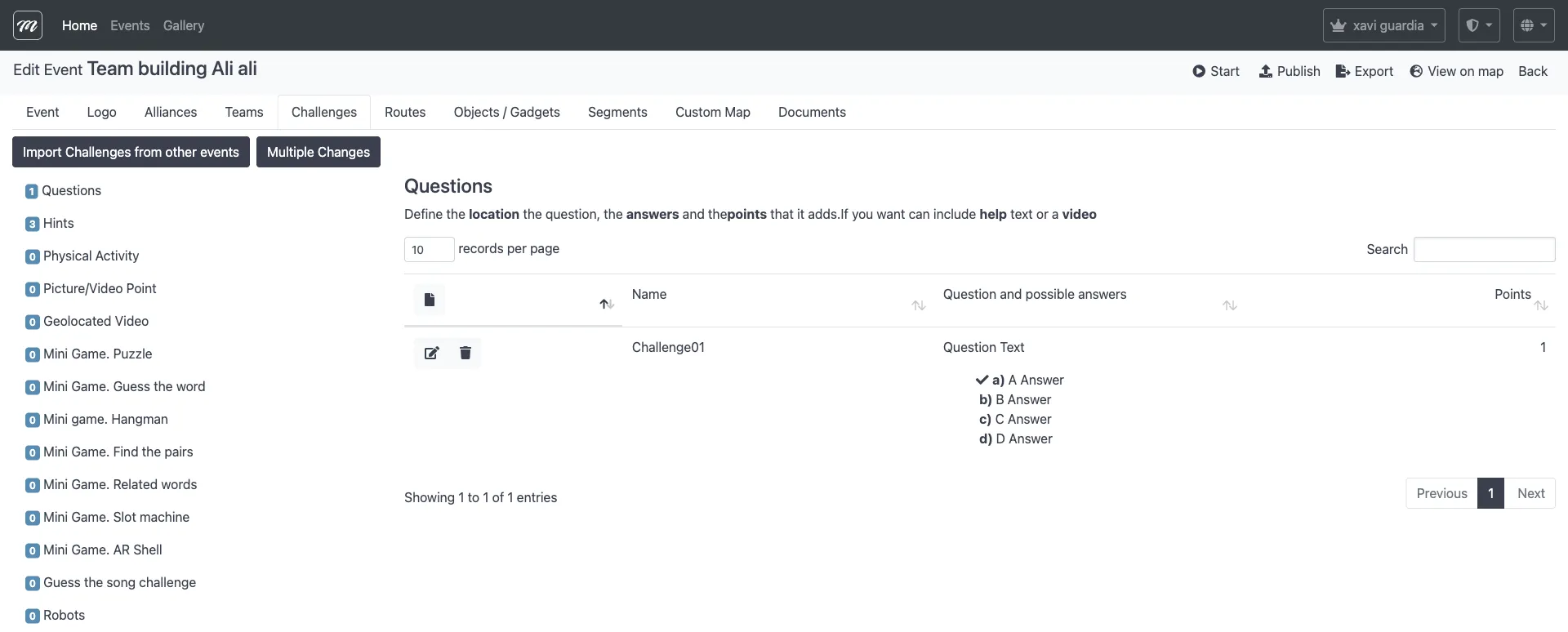
For challenge management (list, create, edit, delete, import, bulk edit), see Event — Challenges.
Type summary
Section titled “Type summary”| # | Type | Category | Player experience |
|---|---|---|---|
| 1 | Questions | Knowledge | Answer multiple-choice or free-text questions |
| 2 | Hints | Narrative | Read informational content — no answer required |
| 3 | Physical Activity | Physical | Complete a physical task at a location |
| 4 | Picture / Video | Creativity | Take a photo or record a video as proof |
| 5 | Geolocated Video | Multimedia | Watch a video that plays upon arrival |
| 6 | Puzzle | Mini-game | Reassemble a jigsaw puzzle image |
| 7 | Guess the Word | Mini-game | Guess a hidden word using clues (hangman is a player-app variant) |
| 8 | Find the Pairs | Mini-game | Match identical cards in a memory game |
| 9 | Related Words | Mini-game | Group words by their relationships |
| 10 | Slot Machine | Mini-game | Spin a virtual slot machine |
| 11 | AR Shell | Mini-game | Find a hidden object using augmented reality |
| 12 | Guess the Song | Multimedia | Identify a song from an audio clip |
| 13 | Robots | Interaction | Chase or evade virtual characters on the map |
| 14 | Prizes | Reward | Spin a slot machine to win virtual prizes |
Common fields
Section titled “Common fields”Most challenge types share a standard set of fields for activation, map appearance, scoring, and media. Only Robots and Geolocated Video have completely different forms.
Categories explained
Section titled “Categories explained”Knowledge
Section titled “Knowledge”Challenges where the team answers questions. Scoring is automatic based on correctness.
Narrative
Section titled “Narrative”Content-only challenges that provide story context or instructions. No scoring interaction — the challenge is “completed” just by viewing it.
Physical
Section titled “Physical”Challenges requiring real-world physical activity. The team proves completion via photo/video or staff validation.
Creativity
Section titled “Creativity”Open-ended challenges where the team creates something (photo, video). Often scored manually by event staff.
Multimedia
Section titled “Multimedia”Passive content experiences triggered by location (video, audio). Completion is automatic.
Mini-game
Section titled “Mini-game”Interactive games played on the device screen. Scoring is automatic based on game performance (time, accuracy).
Interaction
Section titled “Interaction”Challenges involving dynamic virtual elements on the map (robots). The team must physically move to interact.
Choosing the right type
Section titled “Choosing the right type”| Goal | Recommended types |
|---|---|
| Test knowledge | Questions |
| Tell a story | Hints, Geolocated Video |
| Encourage creativity | Picture/Video |
| Add physical movement | Physical Activity, Robots |
| Gamify with mini-games | Puzzle, Guess the Word, Pairs, Slot Machine, Related Words |
| Use augmented reality | AR Shell |
| Musical entertainment | Guess the Song |
| Reward for reaching a location | Physical Activity |
Related pages
Section titled “Related pages”- Event — Challenges — Challenge management (list, create, edit, delete, import, bulk edit)
- Concepts — Challenge Types — Conceptual overview with use case examples
- Challenge Types (Player App) — How players experience each challenge type